
What Makes an AI Tool Useful at Work?
Plenty of AI tools for work look impressive in a five-minute demo. Far fewer earn a permanent spot in someone's actual workday. The best AI tools for work make a recurring task easier without creating a new layer of friction. The gap between those two things comes down to a handful of practical factors, not marketing copy.
Start With the Task, Not the Brand
"I need an AI tool" isn't really a requirement — it's a feeling. Compare that vague impulse to something concrete: summarize a 40-page vendor contract, rewrite a prickly client email before it goes out, dig through last quarter's spreadsheet for a pattern nobody's spotted yet, turn a meeting's worth of scattered notes into action items, or find one buried fact across three years of internal documents. Each of those is a specific job, and specific jobs point you toward specific kinds of AI tools for work — not toward whichever app currently has the most buzz on LinkedIn.
Look at Where the Work Already Happens
Integration matters more than most people expect going in. A tool that lives inside the software you already use all day — Microsoft 365, Google Workspace, Slack, Notion, Adobe Acrobat, or your CRM — is frequently more useful in practice than a theoretically stronger standalone chatbot that demands its own browser tab. Current Microsoft documentation describes Copilot working directly across Word, Excel, PowerPoint, Outlook, Teams, OneDrive, and SharePoint. Google positions Gemini the same way inside Gmail, Docs, and Sheets. That's not a coincidence — it's a bet that AI assistance is more valuable when it doesn't require you to leave the document you're already working on.
The Five Things That Matter More Than a Long Feature List
Instead of chasing feature checklists, weigh any candidate tool against five factors:
- Task fit — Does it actually do the specific thing you need?
- Context access — Can it see the documents, data, or history it needs to be useful?
- Output quality — Is the result genuinely usable, or does it need a rewrite anyway?
- Workflow integration — Does it sit inside the tools you already use?
- Privacy and control — What happens to the information you give it?
These five factors form the backbone of everything else in this guide. Every recommendation below gets filtered through them.
How Do You Choose the Right AI Tool for a Task?
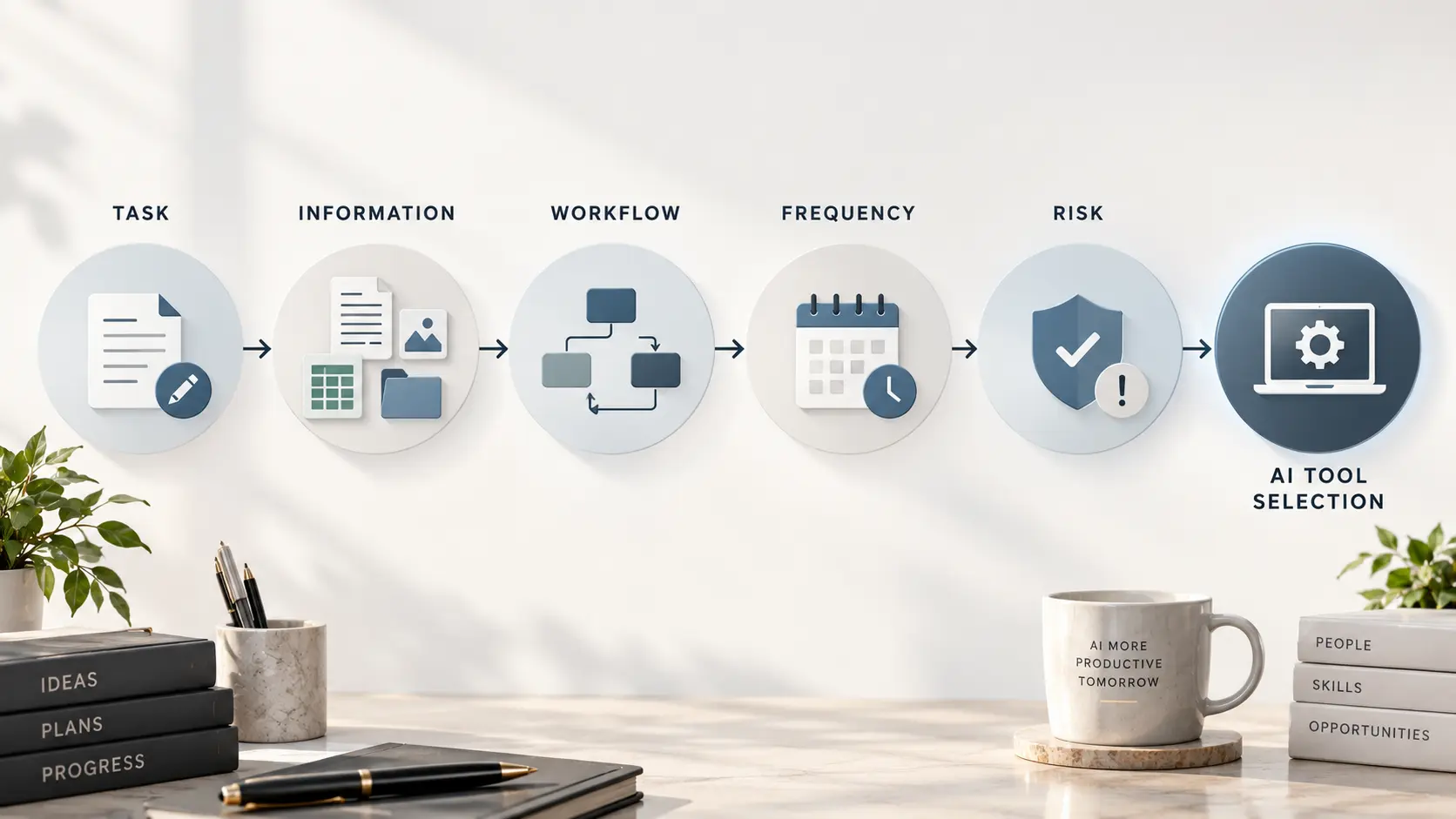
This is the part most "top 10" articles skip, and it's arguably the most useful section in the whole guide. Before you compare a single product, run through five quick questions. That quick check keeps your search for AI tools for work tied to the job you actually need to improve.
Step 1 — Define the Output
What are you actually trying to produce? A first draft, a summary, a decision, a chart, a completed action? Vague goals lead to vague tool choices. "Help me with writing" is a weaker starting point than "I need three subject-line variants for a cold outreach email by 2 p.m."
Step 2 — Identify the Information Source
Does the tool need your own documents, company knowledge, live web information, spreadsheet data, meeting recordings, or email history? A general-purpose AI assistant without access to the information your task depends on can brainstorm, but it can't reliably tell you what's actually in last month's expense report. The important question is whether the tool can securely access the needed information through uploads, connected apps, workspace integrations, or other approved sources. That distinction alone rules out entire categories of tools for certain tasks.
Step 3 — Decide Whether You Need Generation, Analysis, or Action
Think of it as a spectrum: Generate → Analyze → Assist → Automate. A chatbot might be enough if you just need generation — a draft, an outline, some brainstormed options. A document AI tool is usually better suited to analysis, since it can work directly from a source file instead of guessing. An integrated assistant tends to shine on recurring work that lives inside one app. And an automation platform earns its keep when the system needs to take actions across multiple applications without a human clicking through each step.
Step 4 — Consider How Often the Task Occurs
A five-minute task you do once a month probably doesn't justify setting up a complicated AI workflow. A twenty-minute task you repeat a hundred times a month is a completely different calculation, and it's usually where automation and specialized AI tools for work actually pay for themselves.
Step 5 — Check the Consequences of Being Wrong
Not all mistakes cost the same. A tool that helps brainstorm social media captions carries a very different verification burden than one used to summarize a contract, analyze financial figures, or draft material headed to a client. The higher the stakes, the more a human needs to check the output before it goes anywhere near a decision — a theme we'll come back to later, and one that connects directly to how to spot and reduce AI hallucinations.
What Are the Best AI Tools for Common Work Tasks?
Rather than ranking "Best AI Tool #1, #2, #3," it's more useful to organize the market the way people actually run into it: by task. The table below maps common work needs to the type of AI tool worth evaluating, along with real examples to research further.
| Work Task | Strong Fit | Main Strength | Watch-Out | What Matters Most |
|---|---|---|---|---|
| General writing & brainstorming | ChatGPT, Gemini, Copilot | Broad coverage across drafting, rewriting, ideas, and analysis | The strongest choice depends on your data, workflow, and ecosystem | Quality, context, ease of use |
| Microsoft 365 work | Microsoft 365 Copilot | Deep integration with Word, Excel, PowerPoint, Outlook, Teams, and Microsoft 365 data | Most compelling when Microsoft 365 is already central to the workflow | App integration, permissions, company data |
| Google Workspace work | Gemini for Google Workspace | Assistance inside Gmail, Docs, Sheets, and the wider Workspace environment | Most compelling when Google Workspace is already central to the workflow | Workspace integration, context, controls |
| Writing refinement | Grammarly | Editing, tone, clarity, and communication consistency | Less suited to deep research, document analysis, or cross-app automation | Tone, clarity, team consistency |
| Document/PDF analysis | Acrobat AI Assistant | Questions, summaries, and source-linked document analysis | Primarily valuable when PDF/document work is a major part of the job | Source grounding, citations, document workflow |
| Knowledge management & meeting workflows | Notion AI | Connected workspace search, meeting notes, and AI-assisted knowledge work | Strongest fit when the team already works in Notion | Search, context, connected knowledge |
| Workflow automation | Zapier | Connecting AI-enabled workflows across business applications | Workflow design and reliability still require human oversight | Integrations, reliability, controls |
| Research-heavy work | General/research AI | Web research, synthesis, and source-based analysis | Verify important claims and distinguish public research from internal knowledge | Sources, citations, reasoning |
Current official product information backs up these distinctions. OpenAI describes ChatGPT as suited to workplace writing and general business workflows. Microsoft positions Copilot across its productivity suite. Google builds Gemini directly into Workspace and has expanded it toward broader cross-app assistance. Grammarly is built specifically around workplace communication. Adobe designs its Acrobat AI Assistant around document and PDF work. Notion leans into workspace context, enterprise search, meeting notes, and agents. Zapier focuses on connecting AI models to business workflows across apps.
One editorial rule worth stating plainly: no tool here gets labeled "the best," full stop. You'll see language like strong fit for, worth considering if, best suited to, and less compelling if throughout this guide, because that's simply how tool selection works in practice. The right pick depends on your task, your existing software, and your risk tolerance — not on which company ran the flashiest ad this quarter.
Quick Picks: Which AI Tool Fits Which Work Situation?
Use these as strong-fit starting points, not permanent rankings. For AI tools for work, the best choice still depends on the actual workflow.
- General-purpose AI: ChatGPT, Gemini, or Copilot — best when you need flexible help with writing, brainstorming, summarization, analysis, and general knowledge work. Choose based on output quality, secure context access, and your existing ecosystem.
- Microsoft 365-heavy work: Microsoft 365 Copilot — strongest when Word, Excel, PowerPoint, Outlook, Teams, OneDrive, and SharePoint are already central to the workflow.
- Google Workspace-heavy work: Gemini for Google Workspace — strongest when Gmail, Docs, Sheets, Drive, Meet, and the wider Google environment are where the work already happens.
- Writing refinement: Grammarly — a strong fit when the main problem is clarity, tone, grammar, rewriting, or consistency across workplace communication.
- PDF and document-heavy work: Acrobat AI Assistant — a strong fit when contracts, reports, manuals, proposals, and other PDFs are central to the job.
- Connected knowledge and meetings: Notion AI — worth considering when a team already uses Notion and wants meeting notes, search, and AI assistance connected to shared workspace knowledge.
- Cross-app automation: Zapier — a strong fit when repetitive processes need to move information or trigger actions across multiple business applications.
The practical takeaway for AI tools for work: pick the category first, then test two or three credible candidates against the same real task. That produces a better buying decision than comparing feature lists in isolation.
Which AI Tools Are Best for Writing and Communication?
General-Purpose AI Assistants
ChatGPT, Gemini, and Copilot-style tools are strong generalists for brainstorming, outlining, first drafts, rewriting, summarizing, adjusting tone, and generating ideas when you're staring at a blank page. For many AI tools for work, this is the easiest place to start because the value is visible in minutes. OpenAI's own workplace writing guidance specifically calls out drafting, rewriting, tone adjustment, and organizing written work as common day-to-day uses. If you need a rough draft of a project update by 4 p.m., a general assistant will usually get you 80% of the way there in a couple of minutes — the kind of task where an AI writing tool for work earns its keep almost immediately.
Specialized Writing Assistants
Grammarly is a useful example of a more specialized layer that sits on top of general writing help. Rather than generating content from scratch, it focuses on catching awkward phrasing, correcting grammar, adjusting tone for a specific audience, and keeping writing consistent across a team, and it currently emphasizes AI writing assistance, communication, and rewriting across the apps people already use for email and documents.
When a Writing Specialist Is Worth Paying For
The math shifts once volume climbs. If you're the only person in your department sending the occasional email, a general assistant is plenty. For AI tools for work focused on communication, the deciding factor is often volume and consistency rather than raw generation power. If your whole team is writing client-facing material daily and needs a consistent voice across a dozen writers, a dedicated writing tool that plugs into your existing apps starts to look less like a nice-to-have and more like insurance against inconsistent tone. Ask yourself honestly how much writing volume you're actually producing before adding another subscription to the pile.
Which AI Tools Are Best for Research and Knowledge Work?
Research at work is actually several different jobs that people tend to lump together. The right AI tools for work depend on which kind of research you are doing. There's public-web research — finding and synthesizing current information from external sources. There's research from your own documents — finding, summarizing, or comparing information that lives in company files. And increasingly, there is connected knowledge work, where an AI system can search approved workplace sources such as email, shared documents, project knowledge, or other business applications. The right tool depends on which information source the task actually requires. That distinction matters when AI tools for work are expected to work with internal knowledge rather than only public information.
A general-purpose assistant with web access can be useful for the first kind: comparing publicly available approaches, finding current information, or synthesizing multiple sources. For the second kind, the deciding factor is access to the source material. A tool that cannot securely reach your internal contracts, shared drive, or project retrospective will need the relevant material supplied to it. Document AI and workspace-connected tools become more useful when the work depends on those sources — they can perform document Q&A, search connected knowledge, summarize long files, and, in stronger implementations, show which source a claim came from so you can check it yourself.
If you're curious about why these systems can produce such fluent, confident-sounding answers in the first place — and why that fluency isn't automatically the same thing as accuracy — it's worth reading the BTP guide to how large language models work. It's also worth understanding how generative AI works more broadly before you lean on any tool for research that actually matters.
Which AI Tools Are Best for Meetings and Notes?
Meeting-focused AI tools for work generally handle some combination of transcription, summaries, action items, searchable meeting history, and follow-up drafting. The evaluation question that actually matters here isn't "does it produce a summary" — nearly all of them do that by now. It's this: does the tool simply summarize the meeting, or does it help the team do something with the information afterward?
Notion is a useful example on this front, since its AI offering combines meeting notes, connected workspace search, and broader AI workspace capabilities. That means a decision made in a Tuesday meeting can surface later when someone searches for it in November, rather than sitting forgotten in a transcript nobody reopens.
Privacy is worth a specific mention here, separate from the general privacy discussion later in this guide. Recorded meetings often capture things people wouldn't put in writing — candid opinions, compensation discussions, client complaints. Before rolling out a meeting AI tool across a team, check who can access recordings, how long they're retained, and whether external guests are notified that a meeting is being transcribed. Recording-consent requirements vary by state and situation, so check the applicable law and your company's policy before enabling meeting transcription or recording.
Which AI Tools Are Best for Data, Documents, and Analysis?
Spreadsheets and Business Data
For spreadsheet-heavy work, look for AI tools for work that assist with formulas, help explore unfamiliar datasets, flag patterns a quick manual scan would miss, summarize findings in plain language, generate charts, and run basic scenario analysis. Microsoft currently positions Copilot in Excel around data analysis and visualization — helping users explore trends, work with formulas, and create visualizations from spreadsheet data instead of doing every step by hand.
PDFs and Long Documents
Adobe's Acrobat AI Assistant is a good concrete example of document-focused AI. Adobe describes it as capable of summarizing documents, answering direct questions about their content, and providing source-linked citations back to the original page — a small feature that makes an outsized difference when you actually need to verify a claim before repeating it to your boss.
When Document-Grounded AI Is Worth It
There's a meaningful difference between asking a general chatbot to reconstruct information from memory and asking a tool to work directly from the source document in front of it. The first approach is prone to confidently filling gaps with plausible-sounding guesses. The second is anchored to something you can actually check. For anything involving a contract, a financial figure, or a compliance requirement, grounded document AI is the safer default — and it's another point where verification habits from the AI hallucinations guide are directly relevant.

Which AI Tools Are Best for Automation and Workflows?
Assistance vs. Automation
It's worth separating these two ideas clearly, because people often shop for one while actually needing the other. An assistant helps you do the work faster — you're still driving. Automation means the system performs part of the workflow on its own, with far less hands-on involvement from you.
When Automation Makes Sense
Automation tends to earn its cost on repetitive, well-defined processes: routing incoming leads to the right salesperson, summarizing incoming support requests, classifying support tickets by urgency, automatically creating tasks from form submissions, moving information between disconnected apps, or generating a recurring weekly report nobody enjoys building by hand. AI tools for work are most useful in these workflows when the inputs, outputs, and exceptions are clearly defined. Zapier currently positions its AI offering around connecting AI models to thousands of business applications, building agents, and running these kinds of AI-enabled workflows with less custom code.
Don't Automate a Broken Workflow
Here's the part people skip because it's less exciting than the tool itself: if a process is confusing when a human runs it, bolting AI onto it usually doesn't make the confusion disappear. It just makes the confusion happen faster, and now it's harder to catch mid-process because nobody's watching each step. Fix the workflow first. Automate second.
How Should You Compare AI Tools Before Paying?
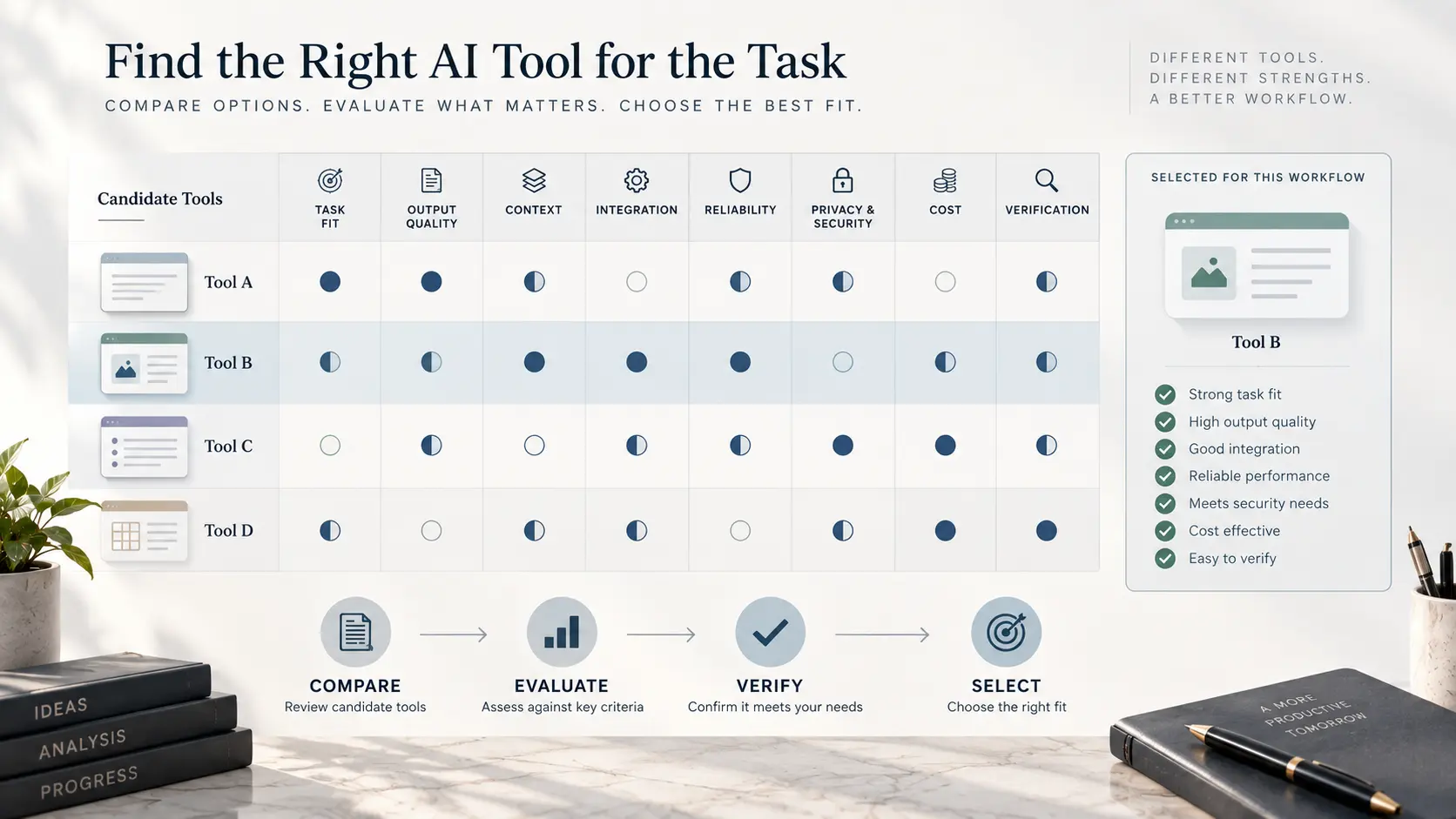
Once you've narrowed down a category, it helps to run candidates through a consistent set of questions rather than deciding based on whichever demo felt most polished. When comparing AI tools for work, that consistency makes the differences between finalists much easier to see.
| Factor | Questions to Ask |
|---|---|
| Task fit | Does it actually solve the problem? |
| Output quality | Is the result good enough to use as-is, or close to it? |
| Context | Can it access the information it actually needs? |
| Integration | Does it work where you already work? |
| Reliability | Does it perform consistently, not just on the good days? |
| Privacy | What happens to your data once you send it? |
| Security | What controls exist for business and admin use? |
| Collaboration | Can more than one person use it effectively? |
| Automation | Can it meaningfully reduce repetitive work? |
| Cost | Does the time saved actually justify the price? |
| Learning curve | Will people realistically adopt it, or quietly ignore it? |
| Verification | How easily can you check the output before trusting it? |
If you want something more structured than a gut check, a simple weighted score can help compare two or three finalists side by side. One reasonable starting split: task fit at 30%, output quality at 20%, integration at 15%, privacy and security at 15%, reliability at 10%, and cost at 10%. Treat those numbers as a practical starting point rather than a universal formula — a legal team will weight privacy far higher than a marketing team drafting social captions, and that's exactly as it should be.
A tool that saves five minutes once isn't necessarily worth another line item on the expense report. A tool that removes the same twenty-minute task every Monday is a different calculation — and much easier to justify at the next budget review.
Compare the Pricing Model, Not Just the Price
AI tools may use free tiers, individual subscriptions, per-user business licenses, or usage-based limits. For a practical buying decision, compare the real cost for the people who will use the tool, check for usage or automation limits, and estimate what recurring work the subscription will replace or accelerate.
Exact pricing changes frequently, so verify current plan details before purchasing. The goal is not the cheapest tool; it is the tool whose recurring value exceeds its recurring cost.
What Should You Check Before Using AI at Work?
This is where a genuinely useful guide to AI tools for work has to get a little less exciting and a little more careful — because the impressive demo is not the same thing as a useful, safe workday.
Company Data
Before adopting any AI tool broadly, get clear answers to a short list of questions: What information are employees actually allowed to upload? Does the provider use business data to train its models, and can that be turned off? What administrative controls exist for managing access? Where is the data physically stored? And what happens to everything an employee entered once they leave the company? OpenAI currently states that business workspace data is excluded from model training by default, while Notion describes contractual restrictions on training with customer data alongside enterprise-level security controls. Policies like these change, so it's worth checking the current terms directly rather than relying on what a colleague mentioned six months ago.
Accuracy
Fluent output is not the same thing as verified information, and that distinction sits at the center of the BTP guide on how to spot and reduce AI hallucinations. A confident-sounding paragraph can still be wrong, and AI models are specifically prone to sounding equally confident whether they're right or not.
Human Review
The higher the stakes of a task, the stronger the verification step needs to be. Brainstorming ten headline options for an internal newsletter needs almost no review. Summarizing a client contract's liability clause needs a human who actually reads the underlying document before anyone relies on the summary. Match your review effort to the actual cost of a mistake, not to how busy you happen to be that day.
A Simple Decision Tree for Choosing an AI Tool
If you'd rather skip the frameworks and get a starting point fast, work through this in order. This is a practical shortlist for choosing AI tools for work without comparing every product on the market:
- Need help generating or editing text? → A general AI assistant or a specialized writing tool.
- Working mostly inside Microsoft 365? → Microsoft 365 Copilot.
- Working mostly inside Google Workspace? → Gemini for Google Workspace.
- Dealing heavily with PDFs? → A document AI tool such as Acrobat AI Assistant.
- Need internal knowledge or search across company documents? → A workspace or knowledge-management AI.
- Need the system to take recurring actions across multiple apps? → An AI automation platform.
- Need something highly specialized for your industry? → Evaluate that specialist tool against the same five-factor framework from earlier in this guide.
None of this is meant to lock you into one answer forever. It's a practical starting point for narrowing a crowded market down to two or three real candidates worth actually testing.
FAQ
What are the best AI tools for work?
There isn't one universal winner. ChatGPT, Gemini, and Copilot are flexible choices for general writing, brainstorming, summarization, and analysis. Microsoft 365 Copilot is a strong fit for Microsoft-heavy workflows; Gemini for Google Workspace-heavy workflows; Grammarly for writing refinement; Acrobat AI Assistant for PDF-heavy work; Notion AI for connected workspace knowledge and meetings; and Zapier for cross-app automation.
What is the best AI tool for workplace productivity?
Start with where your work already happens. If most of your day is in Word, Excel, Outlook, and Teams, an integrated Microsoft assistant may create more value than another standalone app. In other words, the best AI tools for work are often the ones that reduce the number of places you have to switch. The same logic applies to Google Workspace. Productivity comes from reducing friction in the workflow, not from adding the largest number of AI features.
Are AI tools for work worth paying for?
They can be, particularly when a task is frequent, time-consuming, and easy enough to measure. Compare the monthly cost with the time saved and account for the human review still required. A recurring twenty-minute task can justify a subscription much more easily than a five-minute task you perform once a month.
What is the best AI tool for writing at work?
For drafts, rewrites, tone adjustments, and brainstorming, a general-purpose assistant such as ChatGPT, Gemini, or Copilot can cover most everyday needs. For high-volume communication where clarity, tone, and consistency are the main bottlenecks, a specialized tool such as Grammarly can add value.
What is the best AI tool for meeting notes?
Look beyond transcription. Searchable notes, action items, follow-up drafting, and connections to the team's existing knowledge make meeting AI more useful after the meeting ends. Notion is one example; teams centered on other collaboration platforms may prefer a different meeting solution.
What AI tools can analyze documents and PDFs?
Document-grounded tools such as Adobe's Acrobat AI Assistant are designed for this use case, including document summaries, questions about file contents, and source-linked citations. The important criterion is how reliably the tool stays grounded in the source and how easily you can verify its answers.
How do I choose an AI tool for my business?
Define the output, identify the information source, decide whether you need generation, analysis, assistance, or action, consider how often the task occurs, and assess the cost of being wrong. Then compare finalists on task fit, context, integration, reliability, privacy, security, cost, and verification.
Are AI tools safe to use with company information?
It depends on the specific provider, plan, configuration, and information involved. Check whether business data is used for model training, how data is retained, who can access it, what administrative and security controls exist, and whether the tool respects existing permissions. Review current provider terms before a broad rollout.
External Resources
Product capabilities, integrations, and data policies change quickly. Use these official resources to verify current features, plan details, and business terms before making a purchasing or deployment decision.
- OpenAI: ChatGPT for Business and Work — Official guidance on workplace and business use cases for ChatGPT.
- Microsoft 365 Copilot — Official product information covering Copilot across Word, Excel, PowerPoint, Outlook, and Teams.
- Google Workspace with Gemini — Official resources covering Gemini across Gmail, Docs, and Sheets.
- Adobe Acrobat AI Assistant — Official resource for evaluating AI-powered document and PDF workflows.
- Notion AI — Official resource for knowledge management, enterprise search, and meeting notes.
- Zapier AI — Official resource for AI-powered workflow automation.