What AI Productivity Really Means at Work
There's a difference between "using AI" and actually improving your AI productivity, and most workplace advice glosses right over it. Plenty of people open a chatbot, ask it something vague, get a mediocre answer, and conclude that AI is either magic or useless — usually depending on their mood that day. Neither reaction gets you anywhere.
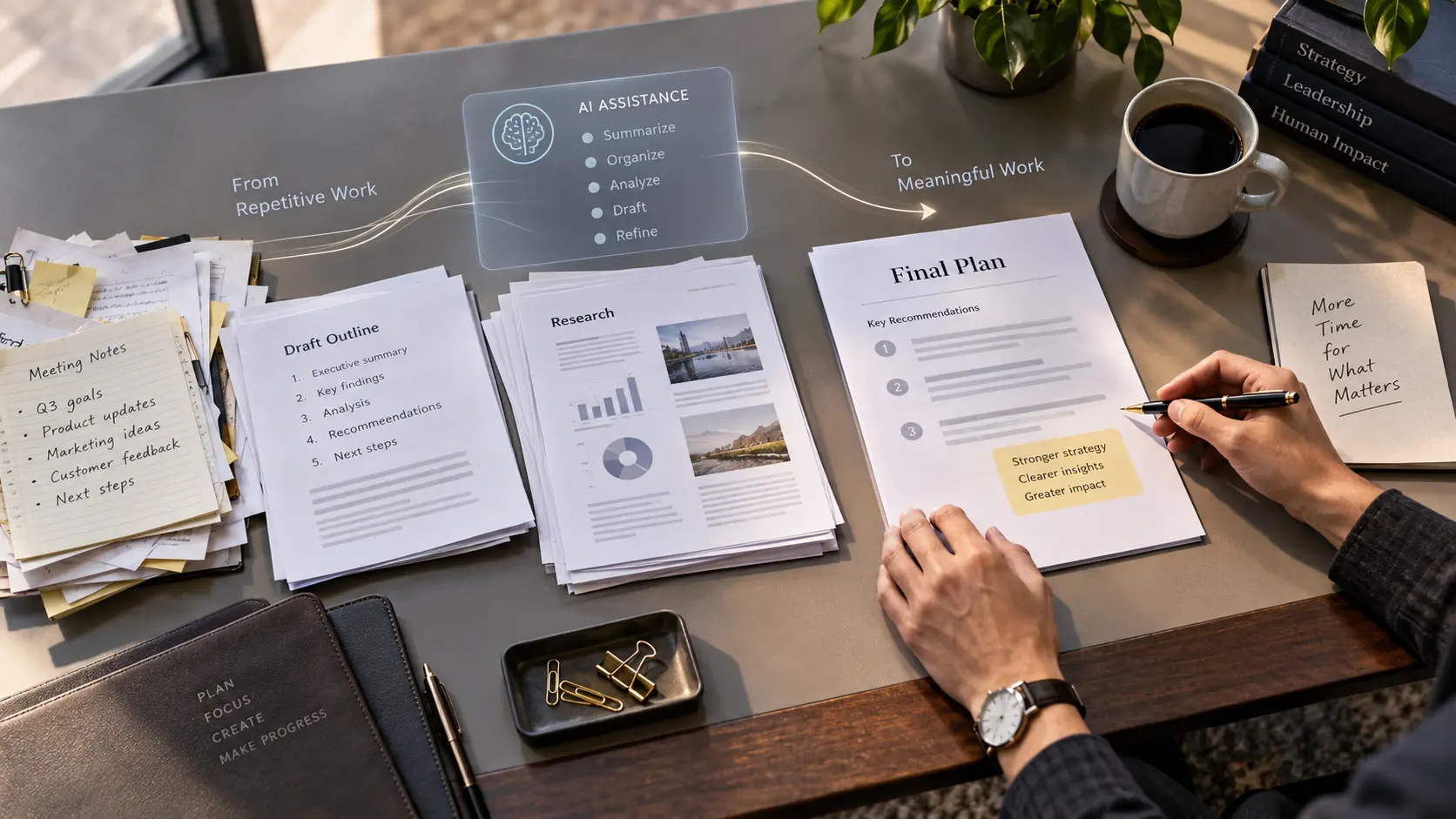
Real AI productivity isn't measured by how often you open a tool. It's measured by whether your output improved and your effort dropped at the same time. That means using AI to absorb the repetitive cognitive load — the note-cleaning, the reformatting, the "let me just get something on the page" drafting — so your own brain is free for the parts of the job that actually require judgment, relationships, and expertise.
It also means treating AI as an assistant, not an unsupervised decision-maker. A good assistant drafts, organizes, and proposes. It doesn't get to sign off on your work, and neither should an AI model. Quality control stays a human responsibility, full stop — which is exactly why "faster" and "better" have to be evaluated together instead of one at a time.
AI Productivity Is About Leverage, Not Speed
The best use of AI at work usually isn't turning a five-minute task into a two-minute task. Nobody's career changes because they saved three minutes on formatting. The real leverage shows up in the tasks that used to eat disproportionate chunks of your day:
- 30 minutes of messy meeting notes turned into a clean summary in a fraction of the time.
- An hour spent staring at a blank document turned into a workable first draft much sooner.
- A sprawling, unfocused research task turned into an organized starting point instead of forty open browser tabs.
- A repetitive spreadsheet review turned into a repeatable, describable process instead of a one-off favor you do for your manager every month.
That's what genuine AI productivity looks like in practice: not a faster version of everything, but a dramatically shorter path through the tasks that were disproportionately slow to begin with.
The Best AI Tasks Have a Clear Finish Line
There's a simple structure worth keeping in your head for the rest of this article, because it comes up again and again:
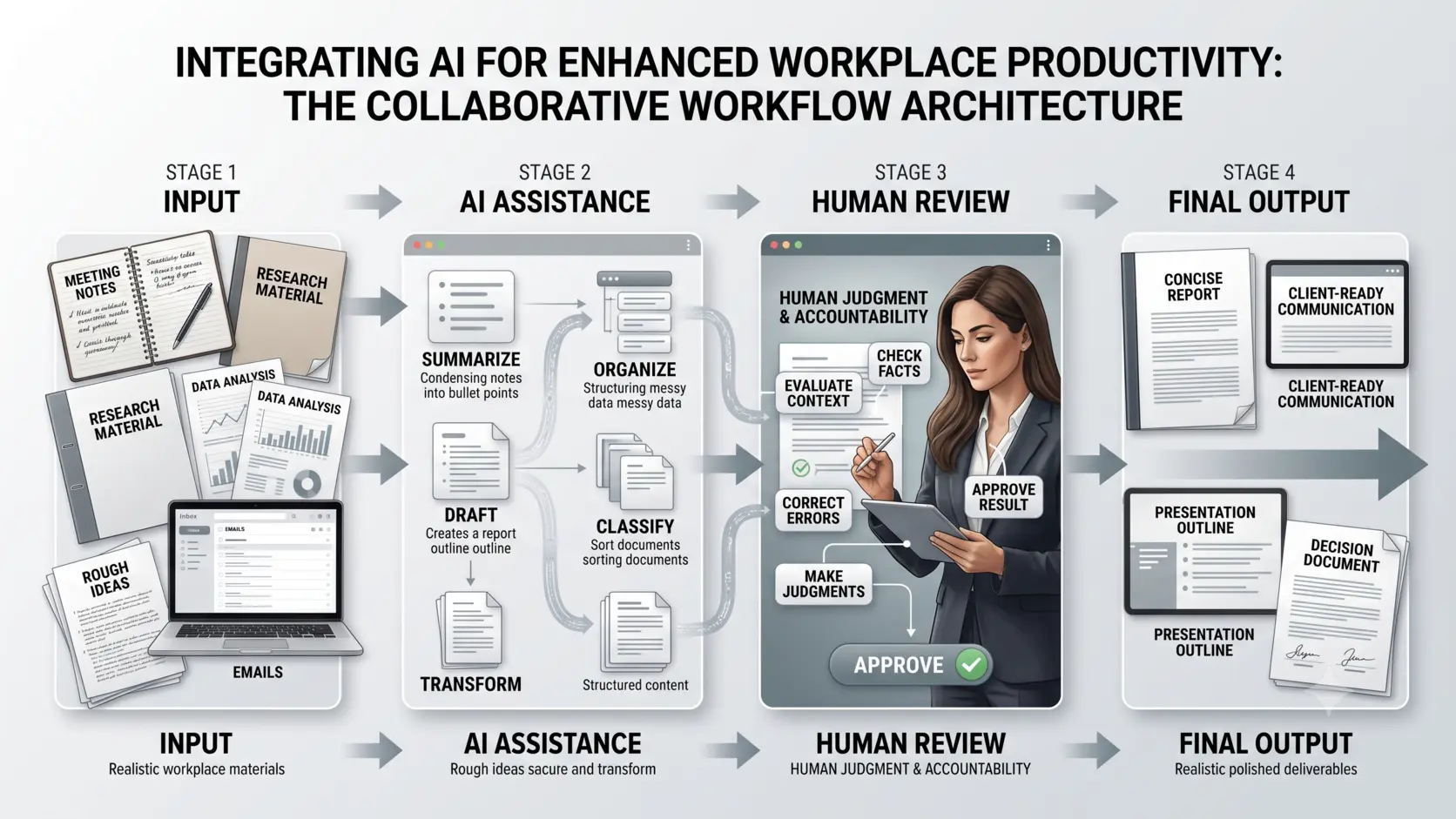
Input → AI assistance → human review → finished output.
Tasks that fit this pattern cleanly tend to be great AI productivity wins. Tasks that don't have a clear "finished" state — ambiguous strategy calls, sensitive people conversations, anything where the "right answer" depends on context AI doesn't have — tend to go sideways when you hand them off completely. Keep that four-step chain in mind, because it's the backbone of everything that follows.
Which Work Tasks Should You Give to AI?
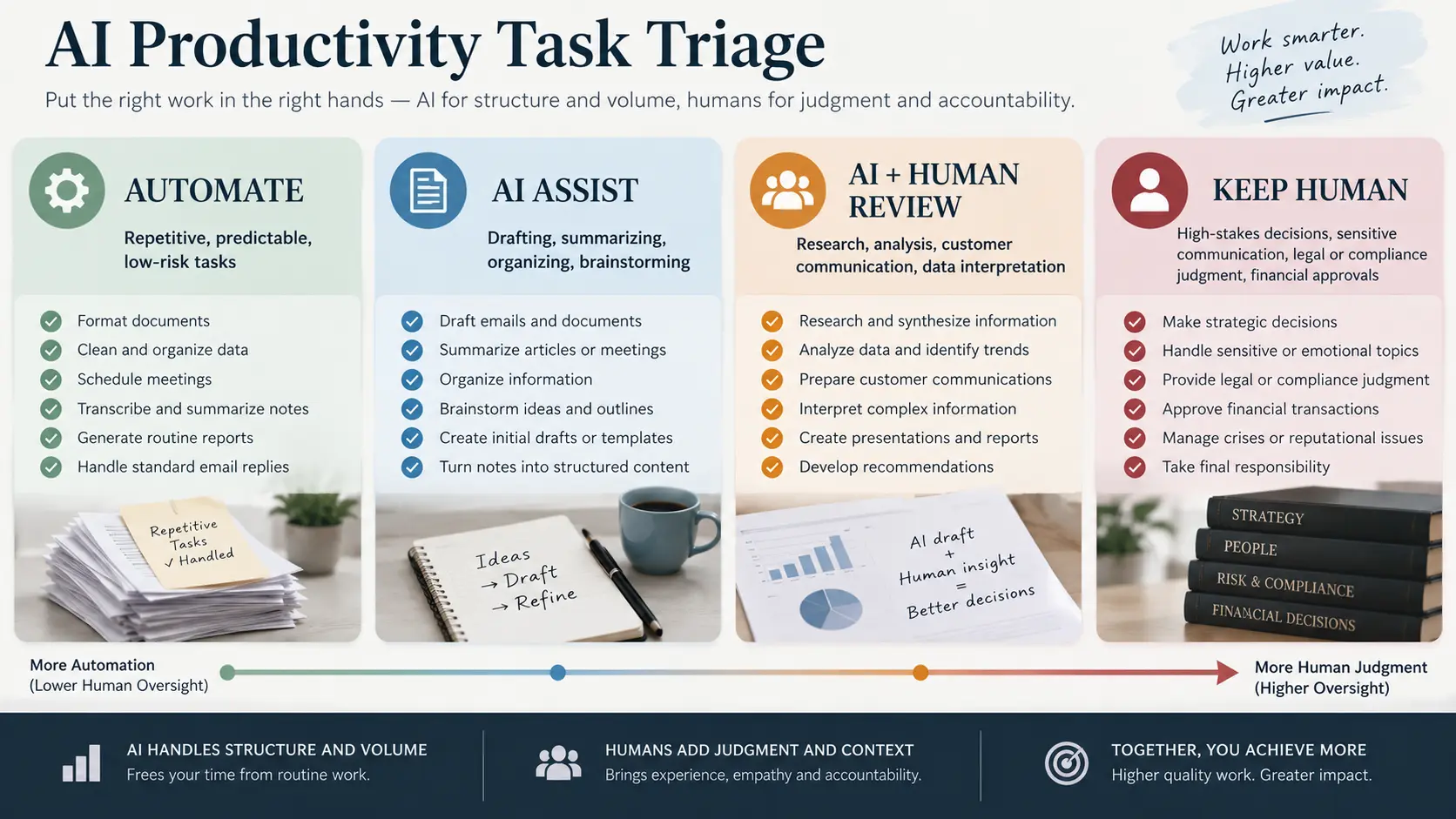
This is where AI productivity stops being theoretical and starts being a decision you make ten times a day. The question isn't "can AI do this?" — modern AI tools can attempt a surprisingly wide range of workplace tasks. The better question is "should the result be trusted without heavy supervision?"
Good Candidates for AI
These tasks tend to produce strong AI productivity gains with relatively low risk:
- Summarizing long documents, threads, or transcripts
- Rewriting for tone, clarity, or a different audience
- Drafting a first version of an email, memo, or report
- Brainstorming options when you're stuck
- Organizing scattered notes into structured information
- Extracting recurring themes from feedback or survey data
- Turning rough notes into a formatted document
- Building a first-pass outline for a presentation
- Classifying or tagging information at scale
- Drafting meeting follow-ups and action items
- Doing routine, low-stakes research
- Converting one format into another (notes to slides, transcript to summary, data to chart description)
Tasks That Still Need Strong Human Judgment
AI productivity has limits, and pretending otherwise is how people get burned. Keep these squarely in human hands:
- Final recommendations that carry real consequences
- Sensitive or difficult communications (terminations, conflict, bad news)
- High-stakes decisions with limited room for error
- Legal or compliance interpretation
- Anything touching confidential or regulated information
- Performance evaluations
- Financial decisions and approvals
- Any task where a wrong answer creates meaningful downstream damage
A simple decision table makes this easier to apply in the moment:
| Task | AI Role | Human Role |
|---|---|---|
| Meeting notes | Summarize | Confirm decisions |
| Email draft | First draft | Tone + accuracy |
| Research | Organize findings | Verify sources |
| Presentation outline | Structure | Strategy |
| Data analysis | Identify patterns | Interpret implications |
| Customer response | Draft | Approve final message |
Notice the pattern: AI handles structure and volume, and a human handles judgment and accountability. That division of labor is the closest thing this article has to a universal rule for AI productivity at work.
How to Use AI for Everyday Work
This is the part most productivity articles turn into a scattershot list of twenty AI "hacks." Skip that. Real AI productivity comes from a handful of workflows applied consistently, not from novelty tricks you use once and forget.
Email and Written Communication
A reasonably common Tuesday: a manager walks out of a project meeting with five bullet points scrawled on a legal pad and needs a clear follow-up email sent before lunch. Instead of staring at a blank compose window, AI can turn those five bullets into a structured draft quickly.
But the employee still owns the decisions that matter:
- What should actually be promised in writing
- Whether the tone fits the relationship
- Whether the deadlines mentioned are accurate
- What should stay out of the message entirely
The workflow looks like this: raw thoughts → AI draft → tone adjustment → fact check → send. AI can compress the drafting step substantially, but the last three steps are still yours, and they should be — that's where AI productivity earns its keep without becoming a liability.
Meetings and Follow-Up
Meeting cleanup is one of the highest-leverage places to apply AI productivity, mostly because almost nobody enjoys doing it and almost everyone puts it off. AI can help with:
- Summarizing raw notes or transcripts
- Identifying action items buried in a rambling discussion
- Assigning likely owners based on who said what
- Turning a messy discussion into a clean follow-up message
- Preparing an agenda from last meeting's open items
- Generating smart follow-up questions from previous notes
One important nuance: AI should organize the meeting record, not invent decisions nobody actually made. If the transcript is ambiguous about whether something was approved, a good summary flags the ambiguity instead of quietly resolving it in whatever direction sounds cleanest.
Research and Information Overload
Ask a knowledgeable colleague and you'll usually hear the same complaint: it's not that information is scarce, it's that there's too much of it and no time to sort through it. AI genuinely helps here — it can build a research plan, group related findings, summarize long documents, compare competing viewpoints, and flag the questions that still don't have answers.
The catch is verification. AI-assisted research is a starting point, not a citation machine you can trust blindly — always confirm the underlying claims against the original sources before those findings show up in a deck or a client email. For structured guidance on using ChatGPT with everyday work inputs, OpenAI's Everyday work with ChatGPT Work is a useful first-party reference.
Documents, Reports, and Presentations
The path here is familiar by now: notes → outline → first draft → refinement → final document. AI is excellent at producing the first usable version of something — the version that used to require an hour of staring at a blinking cursor. What it can't do is decide what actually matters to your reader, or take responsibility for what ends up in the final file. The professional still owns the finished document, even when AI wrote most of the words in it.
Spreadsheets and Data
AI productivity extends to spreadsheets too, though this is exactly where overconfidence gets expensive. Useful, lower-risk applications include:
- Explaining what a complicated formula is actually doing
- Cleaning or restructuring messy data
- Flagging likely anomalies worth a second look
- Summarizing trends across a large dataset
- Building an analysis framework before you dive into the numbers
What it shouldn't be treated as: an automatically trustworthy calculator. AI models can misread a column, miscount a range, or confidently restate a number that was wrong to begin with. Numbers deserve the same skepticism as everything else on this list — arguably more.
How to Build an AI Workflow Without Losing Quality
This is where AI productivity moves from a handful of one-off tips into something repeatable — a system rather than a party trick.
Start With the Outcome, Not the Tool
Most people start with the wrong question: "What can this AI tool actually do?" That question sends you down a rabbit hole of features you'll never use. The better starting question is: "What part of this workflow is wasting my time?" Start with the bottleneck, then go find the tool or prompt that fixes it — not the other way around.
Give AI Enough Context
Vague prompts produce vague, generic output — and then people blame the AI model for a problem that was really a briefing problem. A useful shorthand for context:
Goal + Context + Inputs + Constraints + Output format + Review standard
Tell it who the audience is, what the objective is, what source material to draw from, what constraints apply (length, tone, format), and what "good" looks like when it's done. Skipping this step is one of the most common reasons people decide AI "doesn't really help productivity" — the tool wasn't given enough to work with in the first place.
Ask for a First Pass, Not Blind Perfection
Nobody writes a flawless prompt on the first try, and chasing one wastes more time than it saves. A better rhythm: generate, inspect, correct, refine, verify, finalize. Consider the first output to be a rough draft with which you can disagree, rather than a finished result that you must either accept or reject.
Create Repeatable Workflows
Once something works, don't rebuild it from scratch next time. Save the prompt. Build a lightweight template. Document the steps as something close to a standard operating procedure. Reusable workflows are where AI productivity compounds — the tenth time you run a process is nearly free because you already solved the hard part once.
Where AI Productivity Can Go Wrong
Any article that only talks about upside isn't being honest with you, so here's the other half.
AI Can Make Bad Work Faster
If the underlying process was flawed to begin with, automating it just helps you make the same mistake more efficiently — and with more confidence, because it arrived instantly and looked polished. Speed doesn't fix a broken process; it just hides the flaw behind better formatting.
The Verification Tax
Every AI-assisted workflow carries a review cost, and it's easy to underestimate. If an AI-generated summary takes two minutes to produce but ten minutes to fact-check, you haven't actually gained eight minutes — you've lost them. Put bluntly: if AI saves you 20 minutes writing a report but creates another 25 minutes of fact-checking afterward, congratulations, you've just automated yourself into overtime.
Those numbers are illustrative rather than a universal benchmark. The point is to measure the entire workflow, including review, rather than counting only the time it takes AI to generate an answer.
Automation Can Create More Work
Watch for these quiet time-sinks:
- Correcting hallucinated facts that sounded completely plausible
- Fixing writing that's technically correct but reads stiff or off-tone
- Reviewing summaries that missed the actual point of the meeting
- Wading through AI-generated output nobody asked for
- Juggling too many disconnected AI tools instead of one solid workflow
Don't Automate Tasks That Should Be Eliminated
This is the piece most productivity content skips entirely. Before reaching for AI, ask whether the task should exist at all. A useful sequence: delete → simplify → standardize → assist → automate.
Automating a report nobody reads doesn't improve your AI productivity — it just makes the waste faster and harder to notice.
How to Verify AI-Generated Work
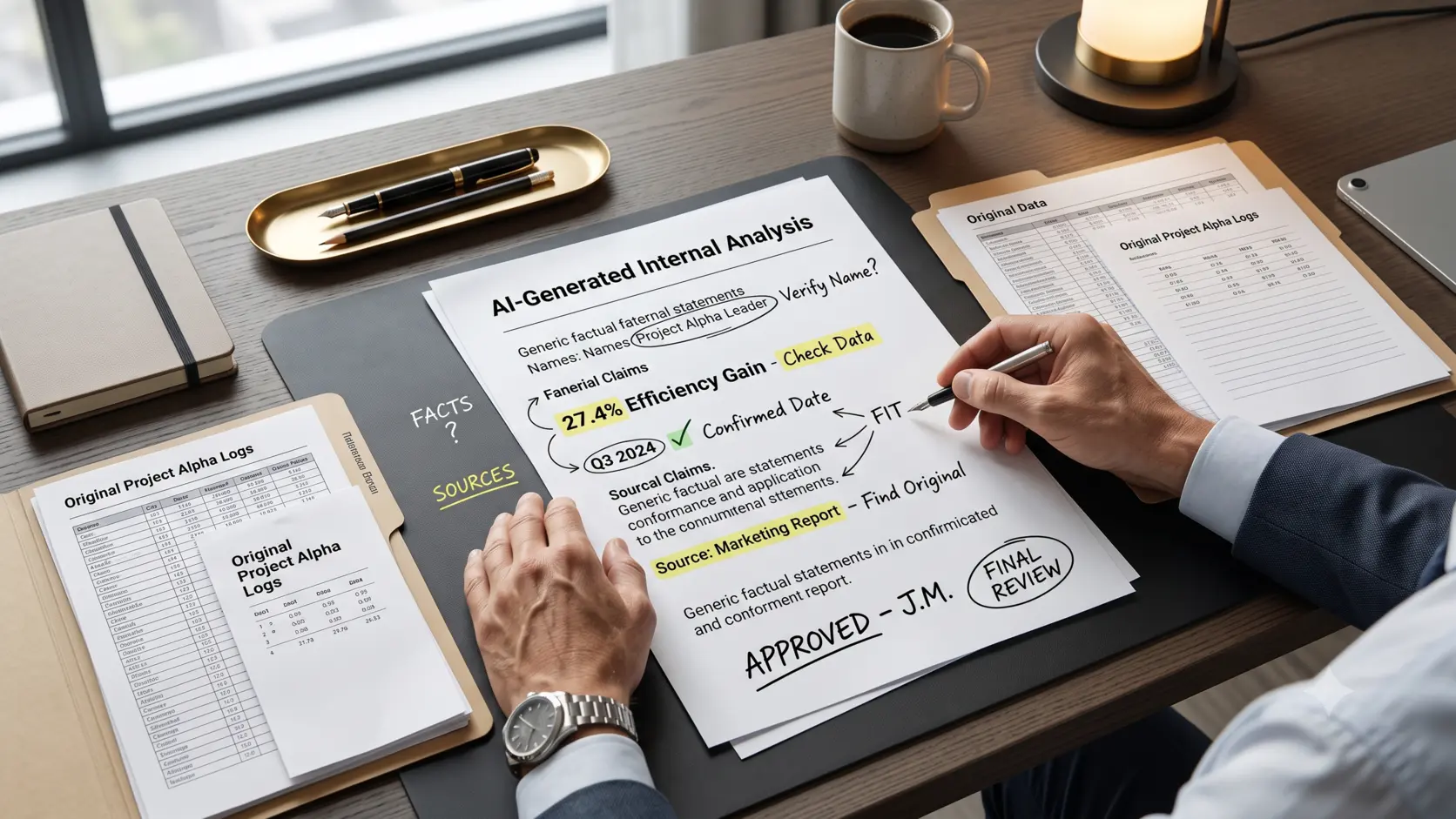
Quality is half the promise of this article, so verification deserves its own space rather than a quick afterthought. A simple four-part check works for almost anything AI produces:
FACTS — Are the factual claims actually correct?
SOURCES — Can the important claims be traced back to something reliable?
FIT — Does the output actually answer the task you gave it, or just something adjacent to it?
FINAL REVIEW — Would you be comfortable putting your name on this exact version?
Give the strongest scrutiny to numbers, dates, names, quotations, legal or compliance claims, financial information, and anything company-specific — those are the categories where a small AI error turns into a real-world problem the fastest. Numbers, steps, and time-sensitive claims should be verified against the original source, not simply accepted because they read smoothly.
How to Protect Company and Client Information
Fast doesn't matter if it creates a mess someone else has to clean up. Before you paste anything into an AI tool, think about what you're actually sharing:
- Confidential company documents and internal strategy
- Customer or client data
- Proprietary processes, code, or business logic
- Personal information about employees or customers
- Passwords, API keys, or other credentials
- Anything your organization hasn't explicitly approved for AI use
Practical guardrails: use AI tools your workplace has approved for the type of information you're handling, check the applicable data-retention and training terms before sharing sensitive material, and follow your organization's security and privacy policies. Additional restrictions may be available using workspace or enterprise technologies, but which is preferable will depend on your employer’s policy and the specific information involved.
OpenAI's Responsible and safe use of AI guidance is a useful first-party reference for thinking about workplace AI use, including keeping humans involved in important work and checking critical information against trusted sources.
The fastest workflow in the world isn't actually a win if it creates a security incident that takes a week to untangle.
A Simple AI Productivity System You Can Start This Week
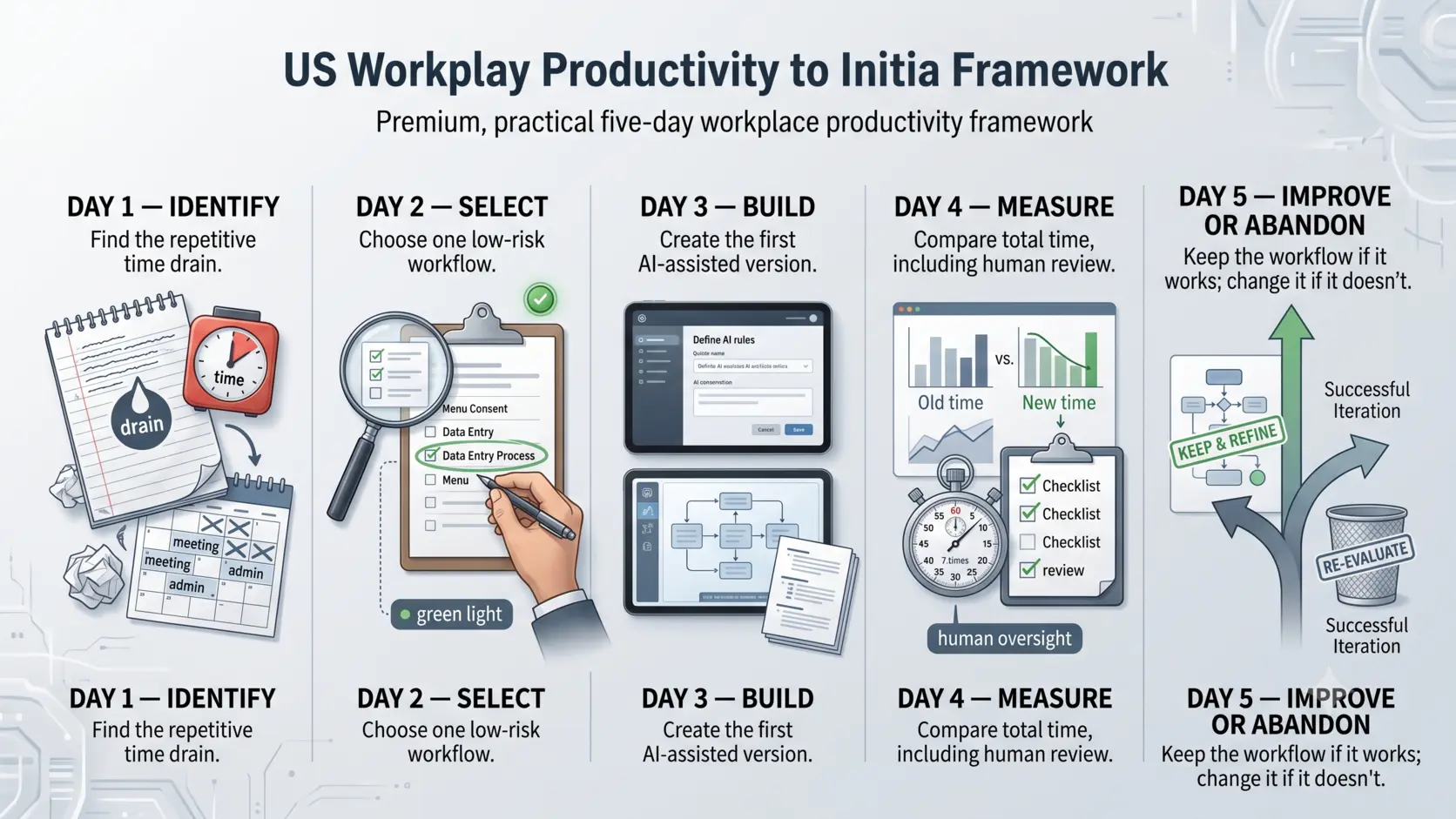
Most people don't need more AI tools. They need a five-day process for figuring out which one workflow is actually worth keeping.
Day 1 — Identify the Time Drains. Track what eats your time for one working day. Be honest about it — the boring, repetitive stuff is exactly what you're looking for.
Day 2 — Pick One Low-Risk Workflow. Choose something repetitive, low-stakes, and easy to evaluate. Meeting notes and first-draft emails are good starting points; anything client-facing or high-stakes is not.
Day 3 — Build the First AI-Assisted Version. Define the input, the desired output, the constraints, and the review criteria before you touch a prompt box.
Day 4 — Measure the Actual Time Saved. Compare the old workflow to the AI-assisted one honestly. Don't assume you saved time just because the AI response arrived quickly — factor in the review step too.
Day 5 — Improve or Abandon It. Ask whether the output was good enough, how much review it actually required, whether it introduced any new risk, and whether you'd genuinely use it again next week. If the answer is no, drop it and try a different task. That's not failure — that's the system working correctly.
This week-long test is a far more reliable path to real AI productivity than downloading five new tools and hoping one of them sticks. Microsoft's 2026 Work Trend Index reports that AI users who get more value from the technology increasingly use AI to extend human capability, while quality control and critical thinking remain important human skills. The report also emphasizes redesigning workflows rather than treating AI as simply a faster way to perform existing tasks.
Frequently Asked Questions About AI Productivity
What is AI productivity?
AI productivity is the practice of using AI tools to reduce the time and effort spent on repetitive or low-judgment work — drafting, summarizing, organizing, researching — so more of your attention goes toward tasks that genuinely need a human. In practical terms, AI productivity at work is a measure of leverage gained, not just tool usage.
How can AI save time at work?
AI saves time by handling the repetitive first steps of routine tasks, such as turning notes into drafts, condensing long documents, organizing scattered information, or creating starting points for reports or presentations. The time savings come from shortening the distance between "nothing" and "a reviewable first version."
What are the best tasks to use AI for at work?
Tasks with a clear finish line and low individual stakes tend to work best: summarizing, drafting, brainstorming, organizing notes, building outlines, and routine research. Higher-stakes work — legal interpretation, financial decisions, sensitive communications — should stay firmly under human control.
Can AI improve productivity without reducing quality?
Yes, but only when human review stays part of the process. AI productivity gains disappear quickly if speed comes at the cost of accuracy, because fixing mistakes later almost always costs more time than the AI saved up front.
How do I know whether an AI workflow is actually saving time?
Compare the full old process to the full new one, including review time. If an AI draft takes two minutes but needs fifteen minutes of fact-checking and rewriting, it may not be saving time at all — it may just be moving the work around. Those figures are illustrative; your own workflow is what should determine the actual result.
Should I automate repetitive tasks with AI?
Often, yes — but check first whether the task should exist at all. Automating a report nobody reads or a process that should have been simplified years ago just makes wasted effort faster, not more valuable.
How can I safely use AI with work information?
Stick to tools your employer has approved, review the applicable data-retention and training terms before sharing anything sensitive, and avoid pasting confidential documents, client data, personal information, or credentials into unapproved tools.
What should I never rely on AI to do without human review?
Anything with real consequences if it's wrong: legal or compliance interpretation, financial decisions, performance evaluations, sensitive personal communications, and any output that will represent your company externally without appropriate human review.
Final Takeaway: AI Productivity Should Give You Time Back, Not Just More Output
Good AI productivity was never about squeezing another dozen tasks into an already crowded day. It's about removing low-value work entirely, using AI where it genuinely creates leverage, keeping humans responsible for judgment and accountability, and actually measuring whether a workflow works instead of assuming it does because it feels modern.
Skip the temptation to overhaul everything at once. Pick one repetitive task this week — the one you already dread — and run it through the five-day system above. If it holds up, keep it. If it doesn't, that's useful information too. Either way, you'll know more about your own AI productivity than a week of reading generic "top 10 AI tools" roundups would ever tell you.
Ready to go deeper? Explore more AI & Productivity guides from Blueprint To Progress, including our breakdown of how generative AI actually works and our guide to building a custom AI assistant workflow for daily operations.